
- AI practice
- Human–AI Collaboration
- Content Workflow
- AI Newsletter
How I Turned a Weekly Publication into a Human–AI Workflow
After 130 issues of a weekly publication, the manual work had become exhausting enough that I paused it. I later broke the process into an SOP and spent a week building a workflow that lets AI handle routine tasks. Here are the steps, pitfalls, and lessons.

Before We Begin
The weekly publication on my WeChat account, FuTalk Design Journal, has now passed 140 issues. It used to be entirely manual. For each issue, I would work through more than a dozen sources: find topics, filter content, read articles, take screenshots, translate, categorise, lay everything out, and finally move each item into the WeChat publishing backend. None of these tasks was particularly difficult on its own. But there were so many small steps, repeated every week, that the whole process could consume more than half a day. It was exhausting enough that I stopped publishing for a while.
Now, the same work takes only a few minutes of my hands-on time. The repetitive parts—collecting material, categorising it, formatting it, and finding images—run through the system. I mainly review, make selections, and give the final approval. I got here by spending about a week building a workflow with human review. This article is a practical account of how I built it, the problems I encountered, the principles I learned, and why I did not make everything fully automatic from the start.
Although this article is about producing a weekly publication, the question I really want to explore is broader: how can someone turn the repetitive, fiddly work they do every week into a standard operating procedure, or SOP, that AI can take over? The weekly is my example for testing the method. The same logic applies to monthly reports, video editing, or organising research. The principle is simple: let AI handle the mechanics, and keep the judgment yourself.
Let’s get into the process.
How I Built the Workflow

Before starting, I needed to understand the principle behind the whole process. First, break the existing workflow into standard steps that AI can follow. The more clearly you can write down how you work, the more effectively AI can help. If a stage depends entirely on intuition and you cannot explain it yourself, AI will struggle too. But if you can describe what happens first, what follows, and how to handle different situations, you can usually hand those steps over gradually.
So my first task was to break down the entire process of producing one issue and identify which steps could be standardised. Here is the sequence I actually followed.
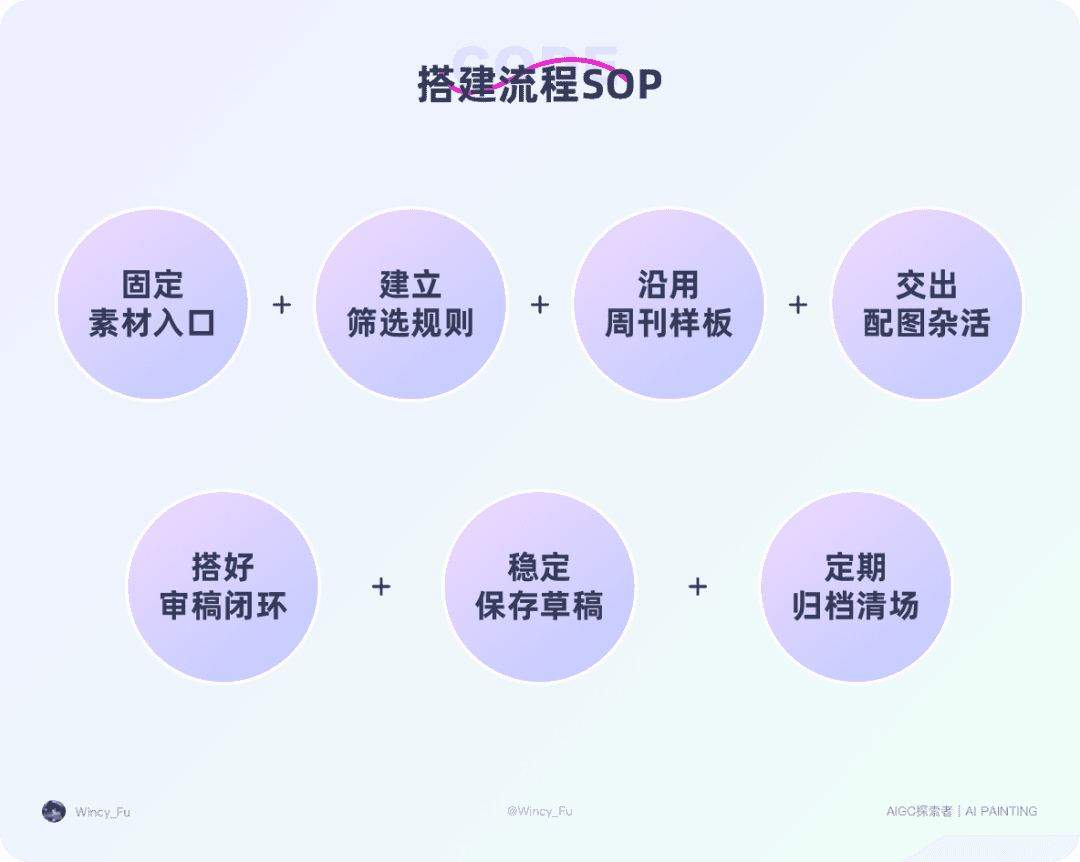
1. Establish a Stable Source Pipeline
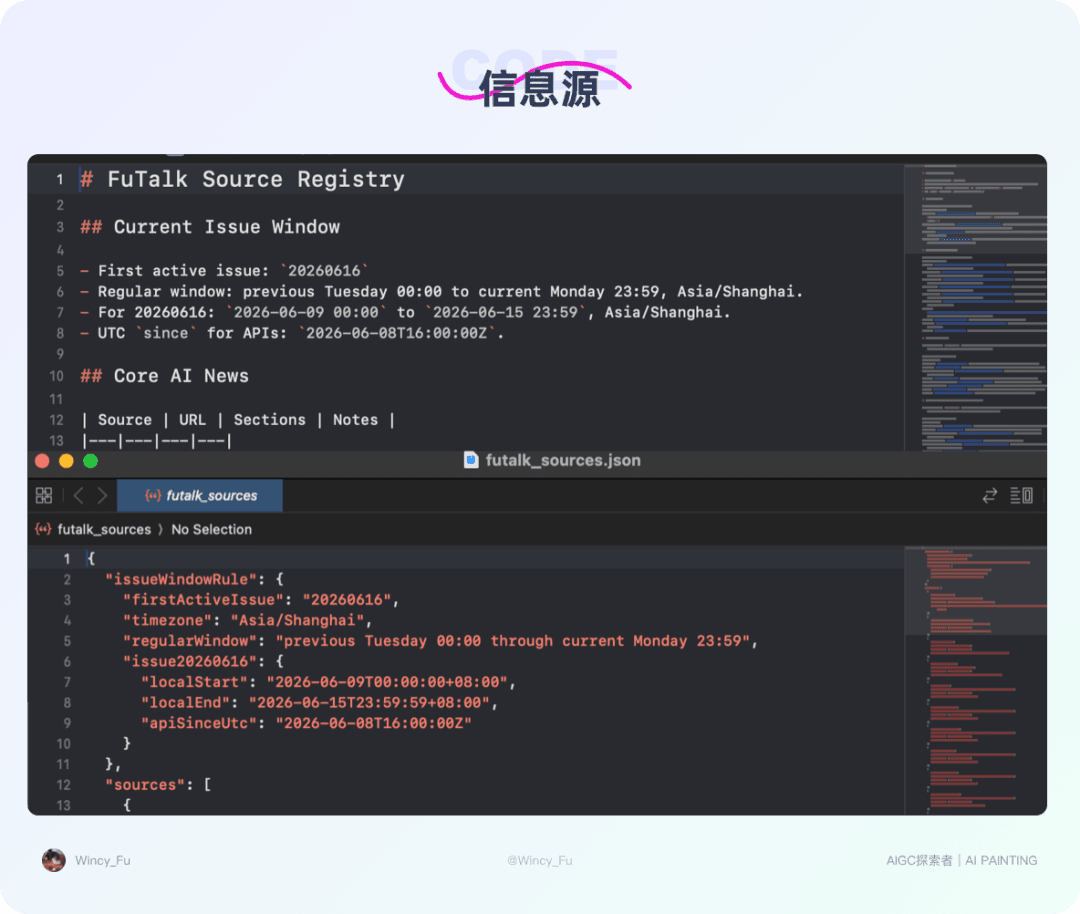
The first step was finding material, and I expanded this gradually. Initially, everything depended on me saving whatever I happened to see. That was heavily dependent on my time and energy. Later, I built a list of reliable sources and asked AI to collect material from them. I then expanded to more public channels, gathering relevant content from the past week. As the scope grew from my own discoveries to a source library and then to wider channels, the material became a relatively stable pool rather than whatever I happened to stumble across.
I also kept a priority route for links I submitted myself. These went straight into the candidate pool without the initial screening. Some material may not be the most popular, but I know it suits my readers. That judgment still belongs with a person.
Collecting from many sources has a cost, though. A mixed pool can contain outdated information, second-hand accounts, promotional articles, and unverified claims. Gathering more is only the beginning. The next important step is teaching AI to filter out unsuitable material.
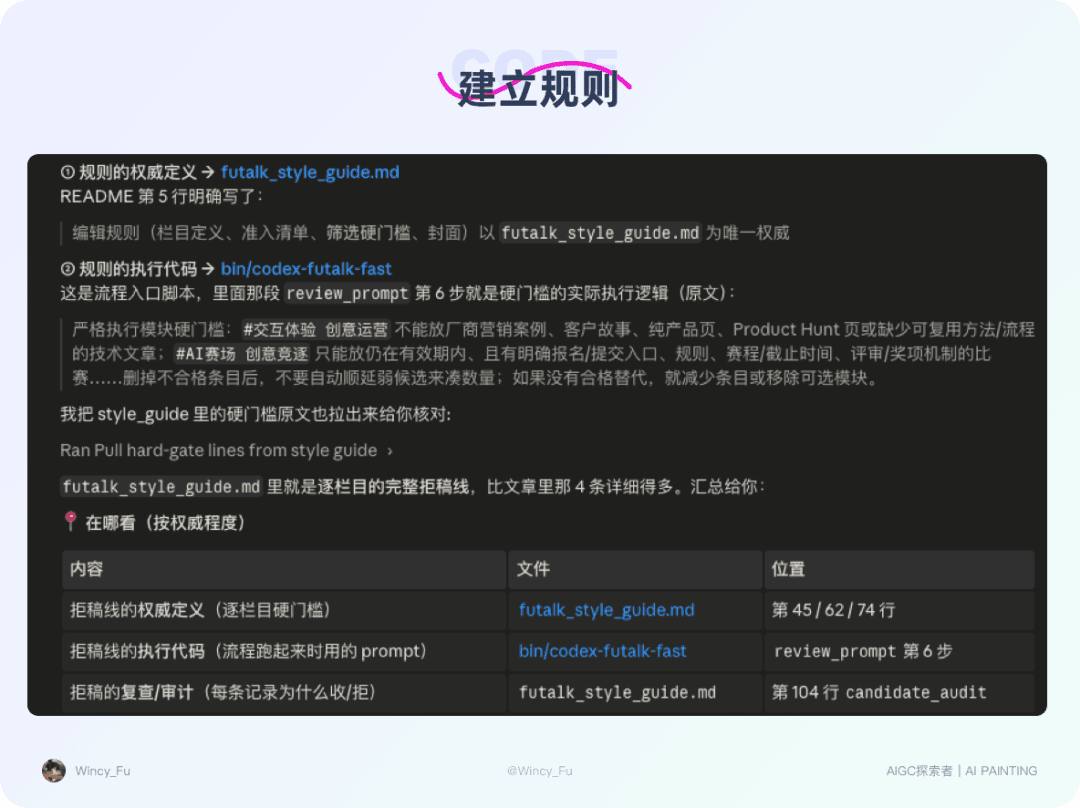
2. Define the Filtering Rules
Once the material had been collected, the real challenge began: a large pool does not mean every item belongs in the weekly. My publication has several fixed sections, so I asked AI to categorise items accordingly. The crucial part was defining what to reject. I gave it several firm rules, for example:
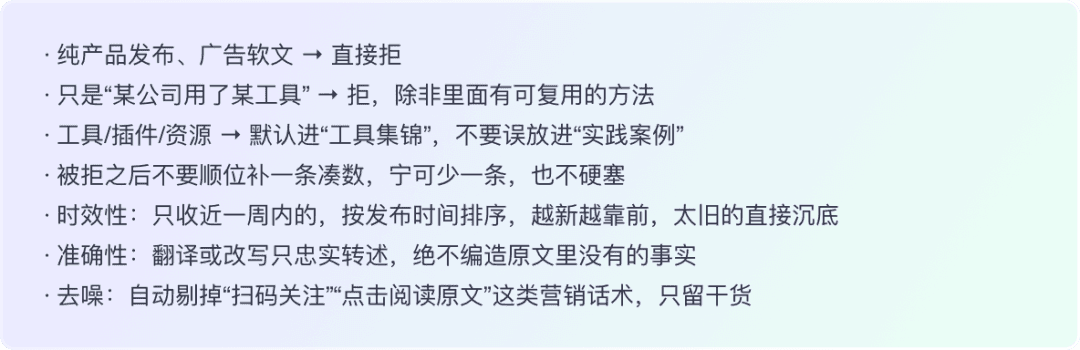
This made a major difference. Previously, AI would often include low-value material just to reach the requested count. Once the rules were explicit, the selection became much more consistent. One lesson: when setting rules for AI, examples of what to reject can be more useful than examples of what to accept. Clearly excluding the outcomes you most want to avoid already gets you a long way. In teaching judgment, clear boundaries around unacceptable results are often the most effective starting point.
3. Reuse a Proven Weekly Template
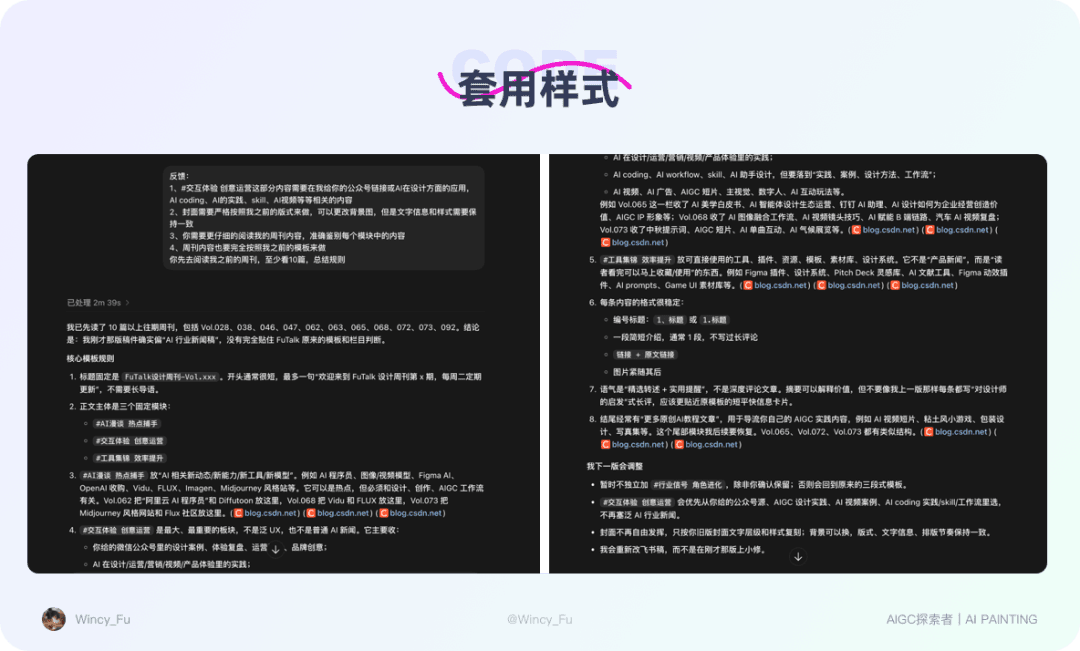
Once each section had its content, the next step was layout. I had one firm requirement: the AI-generated issue had to match my previous issues, including section structure, card styles, heading levels, and the rhythm of colours.
I did not write individual rules for every heading size or spacing value. Instead, I asked AI to study several earlier issues and identify the patterns: how I divided sections, what each contained, and how headings and body text worked together. Once it understood those patterns, it could format new content in the same way. It learned the layout by studying the examples.
For a weekly, a monthly report, or any deliverable with a fixed format, give AI a clear example to follow. The clearer the template, the more consistent the output.
4. Hand Off the Chore of Finding Images
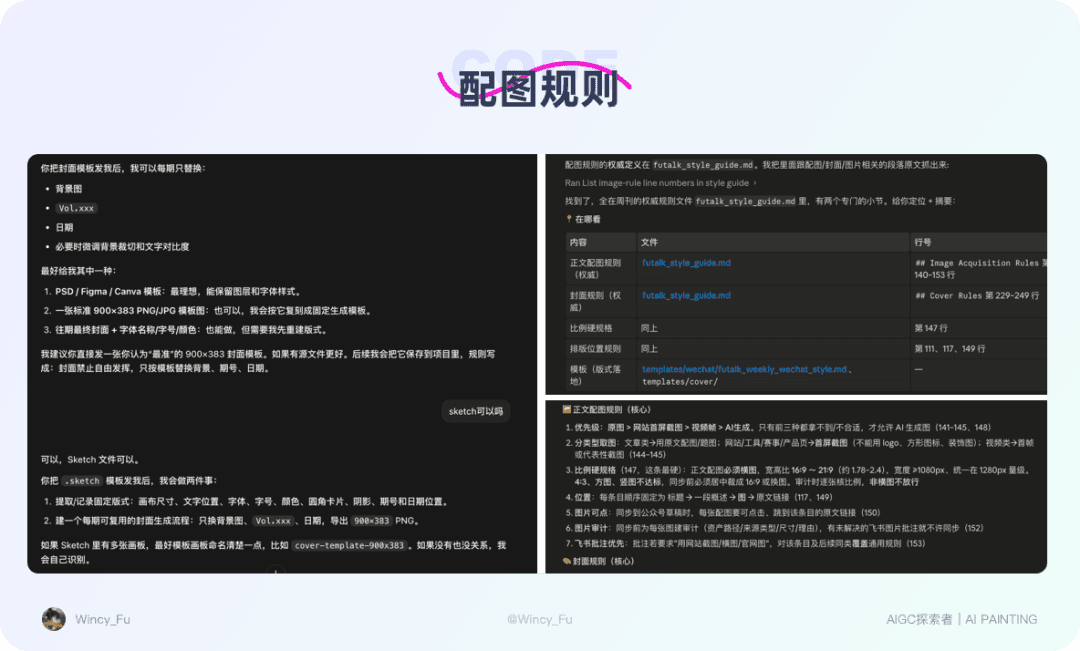
Finding images used to be one of the most troublesome parts of producing the weekly. Some articles already had suitable images; others required screenshots, cropping, or searching for assets. I now handle two kinds of image work automatically:
• Cover: I gave AI my existing Sketch template. For each issue, it replaces the background image, issue number, and date while keeping the layout. It prioritises free images with clear licensing or commercial-use permission, records the sources, and leaves the final confirmation to me to help reduce copyright risk.
• Body images: Use images from the original article first. If an item has no suitable image, generate one with AI that fits the visual style.
This step is not especially sophisticated, but it saves a lot of time. Many images in a weekly support reading rather than constitute the main creative work. Repetitive searching, fitting, and filling gaps are well suited to AI.
The same applies to other work. A step that is repetitive, time-consuming, and requires little judgment is a good candidate to hand over first. My attention is better spent on the final selection and quality.
5. Create a Closed Editorial Review Loop
By this point, AI could lay out a whole issue. But I soon encountered a practical problem: its default output was Markdown. That was fine for reading the words, but I needed to check the final WeChat reading experience. Were the heading levels right? Were the images placed naturally? Had the layout broken? A Markdown file made me imagine the finished result rather than see it.
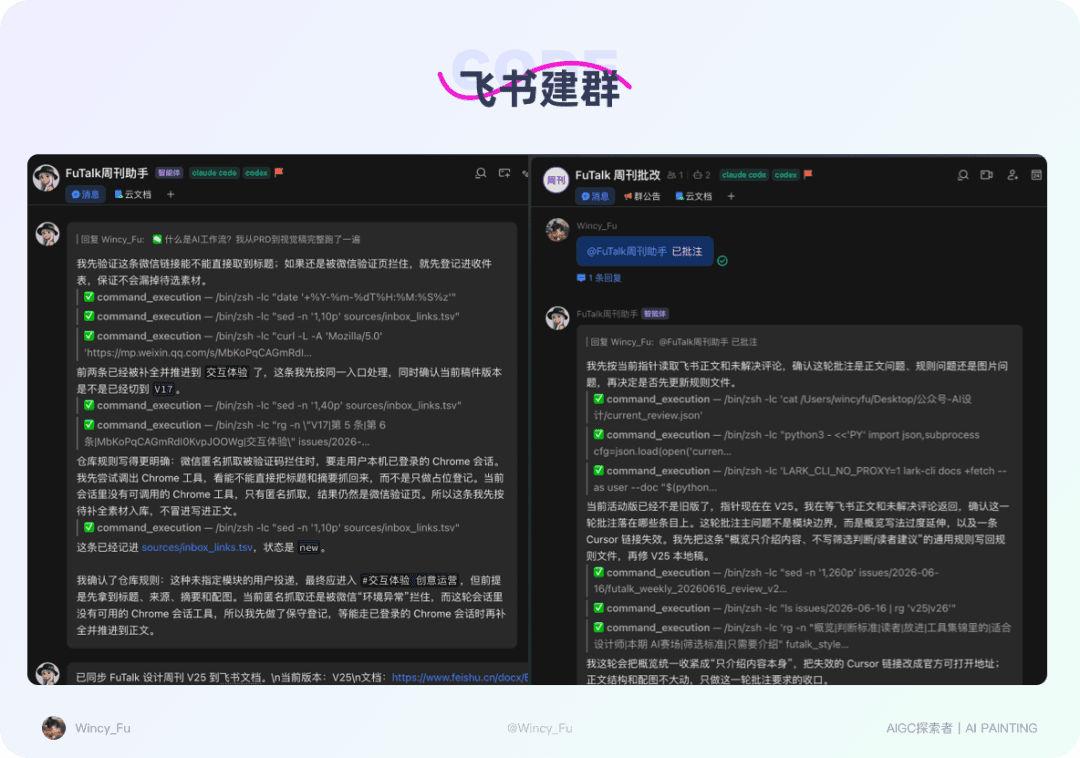
Meanwhile, I often save good articles as I come across them. I used to put them in WeChat’s File Transfer Assistant, but a program could not reliably read that content, so it could not feed an automated workflow. I chose Feishu to meet both needs: I could review a rendered document and AI could read the material I submitted. I set up two groups there.
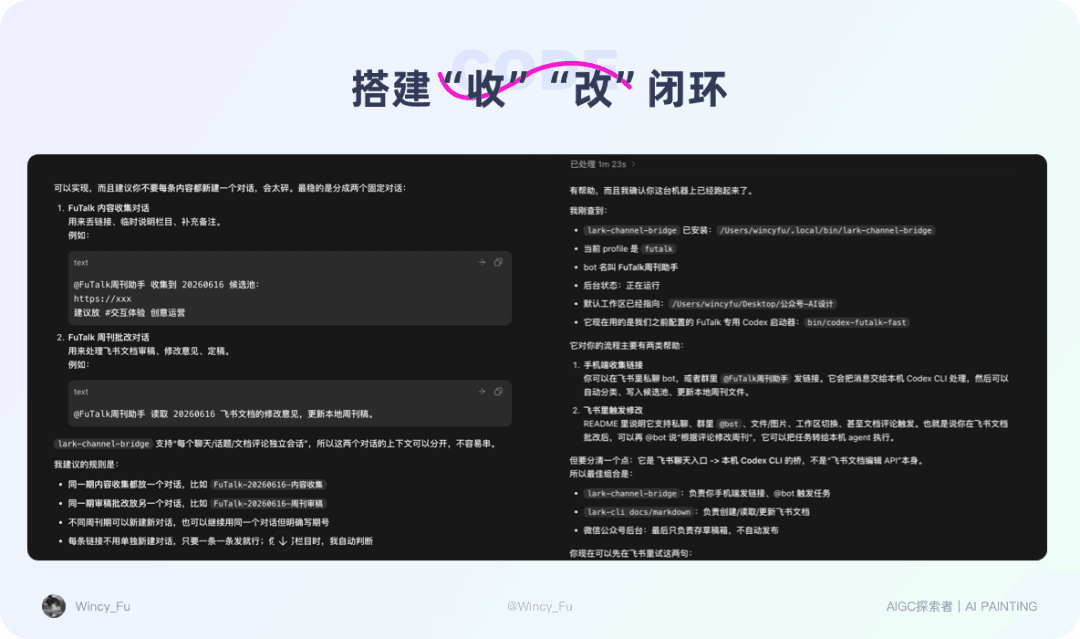
The first group collects material. It is an upgrade to my habit of saving articles on the go. Previously, links in File Transfer Assistant were mostly temporary bookmarks that could not reliably enter the workflow. Now, when I put a link in the group, it enters the source library and the queue for the next issue. An idea saved while I am out becomes material the system can work with.
The second group handles revisions. AI generates a Feishu review document for the whole issue, and I read it on my phone and leave comments, such as:

The key is to distinguish two kinds of feedback. A one-off comment is handled immediately and applies only to that issue. A general principle goes into the rules document so future issues follow it automatically.
That means each review also improves the system’s rules. Over time, it understands my preferences better and needs fewer revisions. This is the most valuable part for me: human judgment and AI execution form a loop that keeps improving.
6. Save Drafts Reliably
The final step is saving the finished issue in the WeChat draft box.
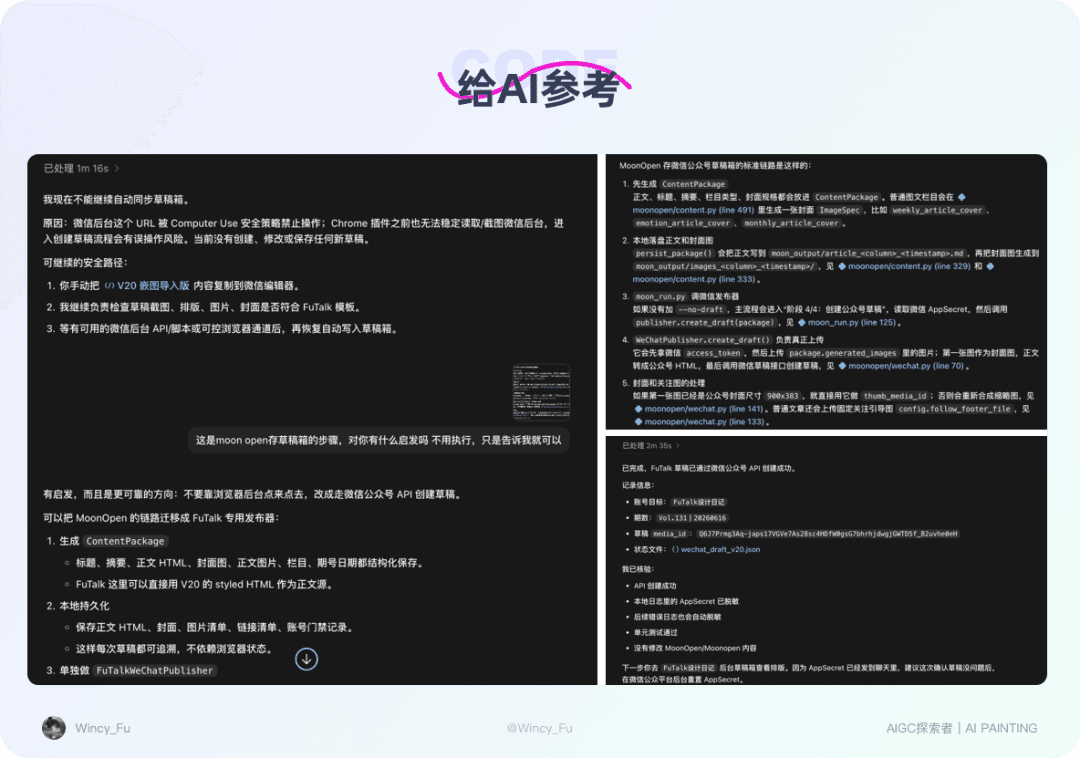
At first, AI chose to automate clicks in the web backend: open the page, upload images, paste the body, set the cover, and save the draft. I still do not know why it chose that route; it was one of those moments when it seemed to lose its sense. The approach was fragile. A change in page structure, a moved button, or an expired login could break the whole sequence.
After several failed attempts, I showed it another project that already worked through an API and asked it to see what could be reused. It then switched to the official API for creating drafts. The title, summary, body HTML, cover, inline images, sections, and issue number were assembled into a structured content package and submitted together. Calling the API directly was far more reliable than imitating clicks in a browser.
7. Archive and Clear the Workspace Regularly
That completed the basic workflow, but I added one easily overlooked step afterwards: cleanup.
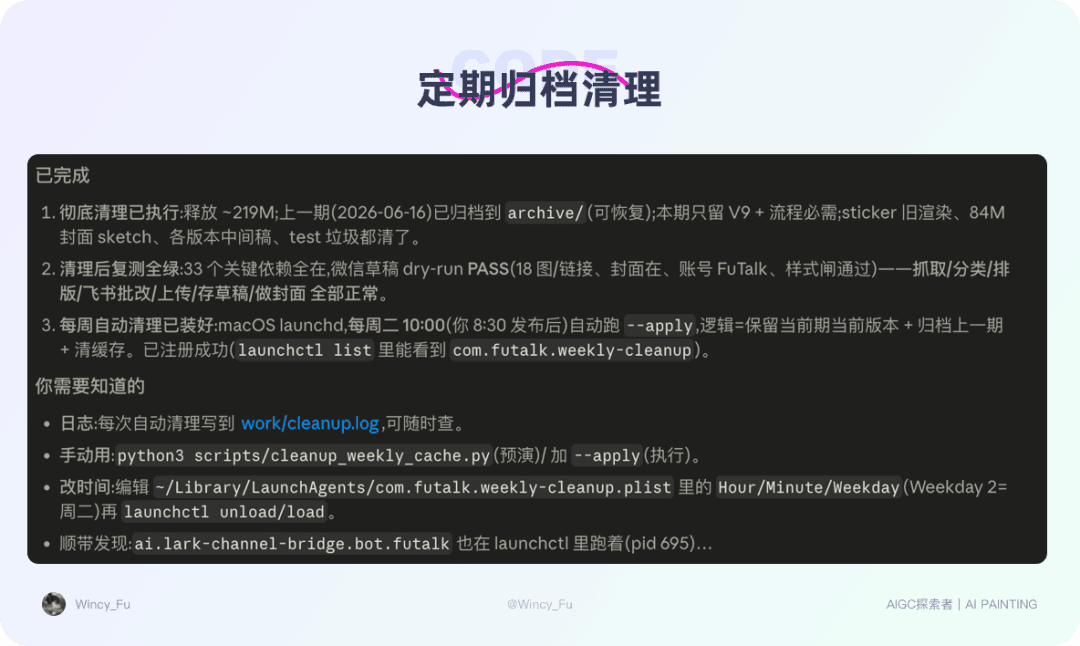
A long-running automation project, especially one that has gone through repeated debugging, accumulates caches, test documents, temporary files, intermediate drafts, and old covers. Left alone, they take up space and make it increasingly hard to tell what can be removed and what must be kept. The workflow becomes harder to manage too.
I asked AI to help clean up, with explicit rules for what to retain, what to archive, and which test caches could be removed. Afterwards, I had it check the whole workflow from start to finish to confirm that the important dependencies were still present and nothing essential had been deleted.
I also scheduled this task for 10 a.m. every Tuesday: archive the previous issue, clear caches, and keep only the current issue in the active workspace. Regular cleanup makes the next run easier to manage and less likely to trip over leftover files. Only after this step did the workflow start to feel like a system I could run over the long term.
The Pitfalls I Encountered

Once I started, I found that many problems were about working with AI, not just code. Here are a few of the most typical.
1. Do Not Start with a Vague Request
At first, I would give a rough request and AI would immediately start writing code. It looked busy, but often went in the wrong direction, produced a lot of work, and then had to start again. Trying to steer that work back on course could be harder than rebuilding it.
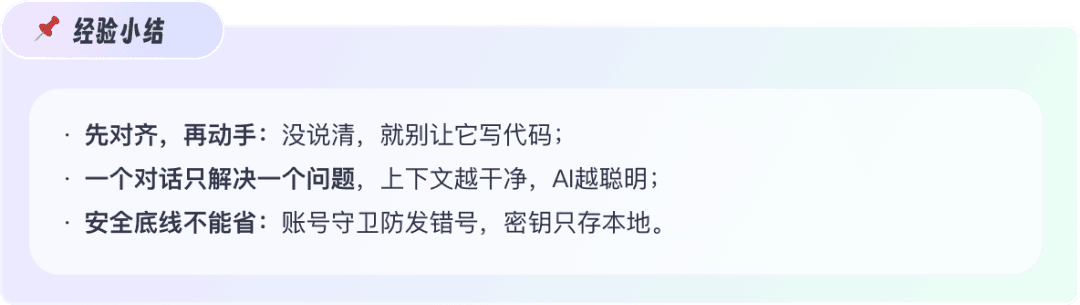
I gave myself a rule: discuss the approach and agree on it before editing code. Until I say “go ahead,” AI should not start implementation. It can ask about unclear points. Once the requirements, boundaries, file structure, inputs, and outputs are aligned, the work is fast and accurate. If the requirements are unclear, greater speed just creates more rework.
2. Keep Each Conversation Focused
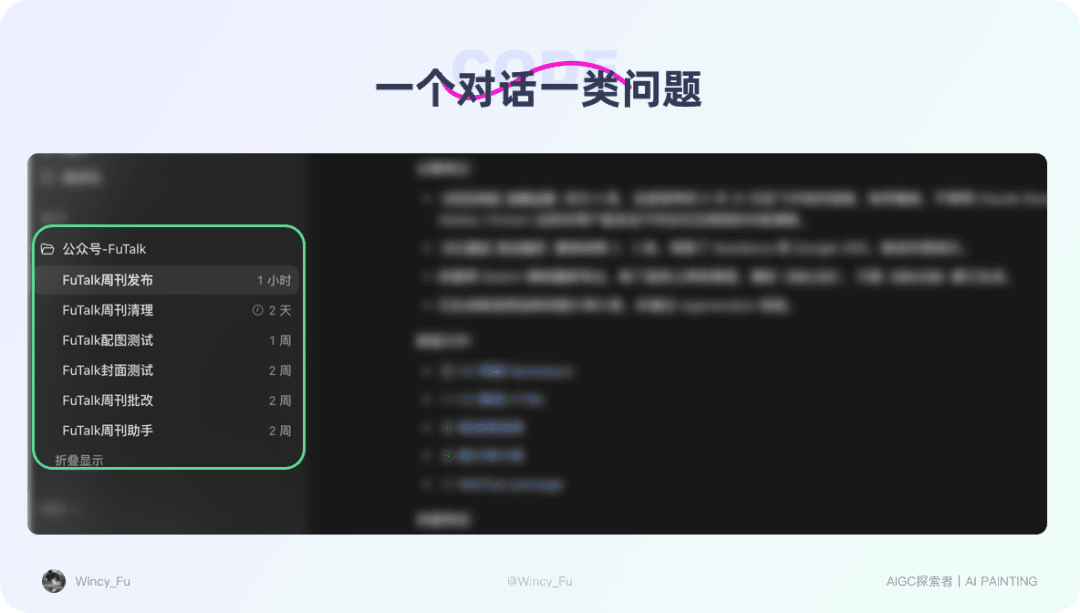
The more tasks and context I packed into one conversation, the more easily AI became confused. It would mix up tasks, keep circling the same problem, or get stuck in a loop.
I now split the conversations: one for selecting topics, one for generating covers, one for Feishu review, one for WeChat drafts, and another for fixing errors. Each follows its own thread. This helps AI make better decisions and makes problems easier for me to trace.
3. Do Not Cut Corners on Security
Once automation involves accounts, credentials, or publishing permissions, convenience alone is not enough. I added at least two protections:
• Account check: I manage several accounts and do not want to publish to the wrong one. Before publishing, the program verifies that the current account is the intended target and stops immediately if it is not.
• Credentials stay local: I do not paste WeChat keys or API credentials into chat. I enter them through a small page that runs only on my computer, store them in a private local file, and let the program read them when it runs.
These details may feel inconvenient, but one mistake is enough to show why they matter.
Principles I Have Learned Along the Way

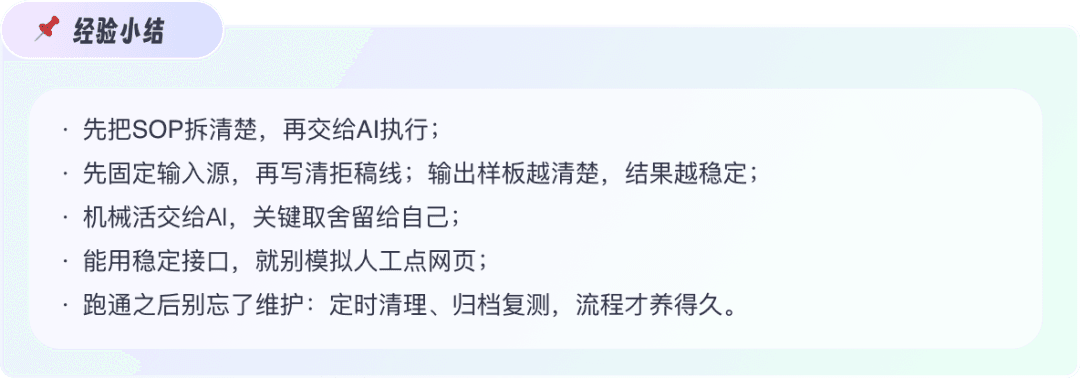
My strongest takeaway is that the valuable part is the method of working with AI. Looking back, many steps could now be replaced with existing skills. But the ability to break complex work into procedures, decide what AI can take over, and recognise what still needs human review will remain useful. The problems I encountered became principles I now check before building a new workflow.
1. Write Down How You Work First
Start by honestly writing down every step you already take. You can only hand work over once you can explain it. If a stage depends on intuition you cannot describe, AI will struggle too. This may feel slow, but it is the foundation for everything that follows.
2. Label Each Step: Routine, Judgment, or Risk
Divide the steps into three categories. Routine tasks, such as finding images, translating, and formatting, can go to AI. Judgment tasks, such as selecting topics, making trade-offs, and setting the tone, stay with me. Risk-sensitive tasks involving accounts, keys, or publishing get an additional human confirmation. Once these categories are clear, it is easier to decide who should do each step and what needs my attention.
3. Give AI a Set of Rules, Not a One-Line Request
Thinking before implementation is much faster than writing without a clear direction. For a new project, I first write a short product requirements document, or PRD, and work through these questions:

If I cannot answer something, I can ask AI to research how others handle it and whether there is a simpler approach. The document need not be elaborate, but its boundaries must be clear: what can be automated, when AI must stop and ask me, and where fewer results are preferable to padding the output. Clear boundaries make it less likely to improvise in the wrong direction.
4. Refine the Work over Several Rounds
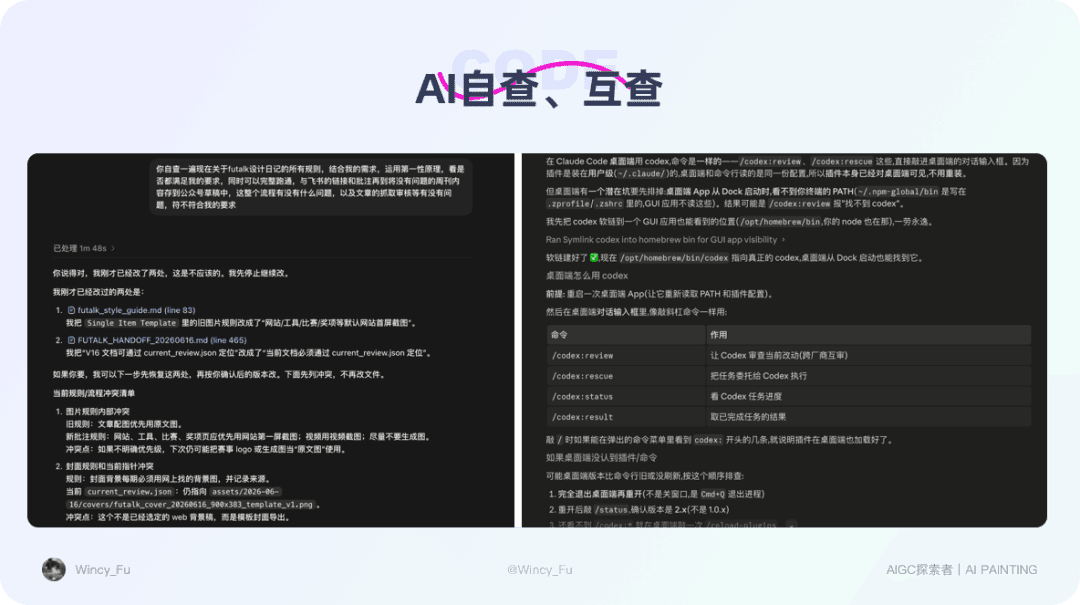
After completing each part, I pause and ask AI to review it from first principles: is there a simpler approach, and are there bugs or security risks?
I also ask different AI tools to review each other’s work. Claude Code might write a section and Codex review it from another angle. Or Codex might run the workflow and Claude Code check for omissions. Recently, I installed the Codex for Claude Code plugin, so I can call Codex directly inside Claude Code for a review. That makes cross-checking easier without switching back and forth.
Still, nothing worked perfectly on the first attempt. It took many rounds between me and AI. The process was often messy: I swung between frustration and excitement, while AI swung between impressively capable and apparently misunderstanding everything I said. An unsatisfying first version is normal. Give it room to improve. Good results usually come from repeated testing, feedback, and revision.
AI writes code quickly, but I still need to think carefully about whether it is right.
Reflections and Conclusions

Once this workflow was running smoothly, routine tasks such as finding images, translating, formatting, and moving content took a few minutes rather than more than half a day. The biggest change was having the freedom to spend that time on things that deserve more thought: refining skills and products, reading, learning English, and exercising. Those are the areas I most want to invest in over time.
I did not rush to make everything automatic. First, breaking the work down showed that review and selection still needed me, so handing over the routine tasks naturally led to a workflow with human review. Second, it had only just started running. I wanted several stable weeks before considering further automation. I researched options such as n8n, cloud servers, and unattended execution, but want the process to be dependable before moving ahead. For now, removing the most tiring repetitive work is enough.
At the same time, I am gradually turning the stable steps into reusable skills. Skills are components; first, you need to know what kind of system you want to build. I am starting with individual capabilities and will gradually package the workflow into a more reliable, reusable tool.
Let AI handle the mechanics, and keep the judgment yourself. That is the workflow that suits me best right now.
I am still refining this workflow and will share more when it is ready. If this article gave you an idea, try putting it into practice tonight: choose one small, repetitive task you dislike, break it into steps, and let AI take over the most mechanical part. Let’s free up time for work that is more meaningful and enjoyable.